I’ve been asked on multiple occasions to produce a blog post covering programming with LLMs from A-Z. In this post I’ll discuss all the most important terms and definitions as well as a multitude of DOs and DONT’s with LLMs and writing code.
These statements will of course be my own opinions, however I hope you’ll be agreeing with all of them by the end :)
This post will be written as if I was addressing a person who fell into a coma in 2019 and just woke up and needed to be brought up to speed with how AI works.
Chapter 1: The Basics
To start, we must understand the absolute basics.
An LLM (Large Language Model) is a statistical machine trained on trillions of tokens. A token is
the smallest unit of text an LLM understands and it is simply a letter or a
string of letters.
Apart from just the alphabet, all punctuation marks like {, ., etc. are also encoded as these tokens.
An LLM’s job is to produce a sequence of tokens it considers to be the most “correct” based on what it has seen before in its massive corpus of data. It can do this from a cold start (without any prior text), or it can continue generating tokens based on a previous sequence that you give it. For example:
When I went to the store, I bought some
Given this, the LLM considers many possibilities and assigns each possibility a percentage:
gro- 60%mi- 20%bre- 10%fl- 5%- …
These percentages come from the model’s training data — it’s what it considers the most “correct” continuation given the text that we gave it. In this example, each predicted token is a cluster of a few letters.
After it produces this data, a random value is selected from the list using the percentages as weights. This means that the most likely continuation given our initial sentence will be “gro”.1
After this, the LLM feeds its own output into itself again, which means it now sees this:
When I went to the store, I bought some gro
Given this, it selects a new range of tokens:
ce- 80%ks- 5%te- 2%- …
Given these percentages, it’s quite obvious the LLM wants to spell out
“groceries”. It keeps doing this until it feels that it has completed the
sentence, after which it emits a special <|end|> token, meaning it’s done.
Whenever there is prior data that the LLM uses to predict things, we call it context. This is very important and will be brought up later.
Prompts
A prompt is an initial set of instructions (context) supplied to the LLM that it must follow. A well-crafted prompt allows the LLM to work smoothly and do exactly what you want it to do.
Here’s an example of a prompt, we’ll explain what all of the terms in this prompt mean later:
RULE: You must NEVER use the 'edit' or 'write' tools to modify code. These
tools are permanently denied.

All code modifications MUST go through the Serena MCP tools
(serena_replace_symbol_body, serena_insert_after_symbol,
serena_insert_before_symbol, serena_replace_content, serena_rename_symbol,
serena_safe_delete_symbol) or the tree-sitter MCP tools.

When you need to modify code:
1. First read and understand the code semantically using
   serena_get_symbols_overview, serena_find_symbol, serena_read_memory, or
   tree-sitter tools.
2. Then apply changes using the appropriate Serena symbol-level tool
   (replace_symbol_body, insert_after_symbol, etc.).
3. For bulk or regex-based replacements across a file, use
   serena_replace_content.
4. Never fall back to raw text editing. If a Serena tool cannot express the
   change cleanly, then fall back on the tree-sitter MCP. Before writing ANY
   code, ALWAYS activate the `ponytail` skill.
Usage In Programming
Now that we know what an LLM does, how does it relate to programming? Well, many LLMs are trained on enormous databases of code, which means they become exceptionally good at writing programs in various programming languages.
Given some initial code as context, the LLM is usually very capable at:
- Understanding what the code in its context does.
- Predicting how the code should be completed so that it works.
This is why AI has become so popular in the programming world recently, and my goal is to teach you all of the most important stuff about it.
Agents
Agents are the most important innovation in the LLM space for programming. Earlier, we explored than an LLM continuously predicts a token until it feels it’s done. An agent takes this a step further, it continues working until it feels it has completed a task. This task can theoretically be anything — ordering food online, writing a whole application or more. How is this leap possible?
Coding Agent
The term here is a bit misleading, and a better term would be orchestrator. A coding agent is an application that manages the LLM and allows it to do agent-like things. You’ll need to install one of these. There are a million of such apps:
- Copilot
- Claude Code
- OpenClaw
- OpenCode
- … and many more!
I highly recommend OpenCode, it’s open source and works very well with all major LLMs. We’ll be configuring this one today.
Coding agents do three main things:
- Connect to the LLM provider (most LLMs are hosted on the cloud)
- Allow the LLM to “loop” or call itself recursively — this lets it work for extended periods of time.
- Allow the LLM to call tools.
Tool Calling
Coding agents do something quite special: they inject a prompt to the LLM that lets the model know the tools it has available. Then, whenever the model needs to do something — search the internet, read/edit a file, execute a command — it simply outputs a special bit of text that the coding agent captures and executes the desired action. This creates an important bridge between the LLM and the outside world.
The Agent Loop
Let’s say you boot up OpenCode. You tell your agent: “find latest information online about the Tornado that happened a week ago and write a summary in a file”. Here’s what happens:
- The agent goes into thinking mode and thinks about your request.
- The agent runs a tool that gets the current date.
- The agent runs a tool that searches the web about a tornado happening a week ago.
- The agent goes into thinking mode and comes up with a summary.
- The agent runs a tool that writes the summary into a file.
Hopefully you can see now why agents are so important and powerful, and how their possibilities are endless given the right tools.
MCPs
An important concept to understand are Model Context Protocol servers, or MCPs for short.
The best way of thinking about an MCP server is as a plugin for your coding agent: it expands the amount of tools that an agent can use, thereby making it more powerful, and can also modify the agent’s prompt. A simple example is Context7, which allows the agent to look up the latest documentation for all the most popular libraries.
If you’ve ever heard of LSP, you can imagine MCPs as a sort of LSP that an agent can connect to.
Skills
A skill can be thought of as a mini-prompt: whenever an agent knows it’ll have to do something specific, like use a bit of software or configure something, it can load a skill.
The skill is simply text instructions with all the best practices as well as explanations for how a task should be executed properly. This allows the agent to stay on track and not get lost in silly mistakes.
With all this in mind, let’s configure OpenCode.
OpenCode
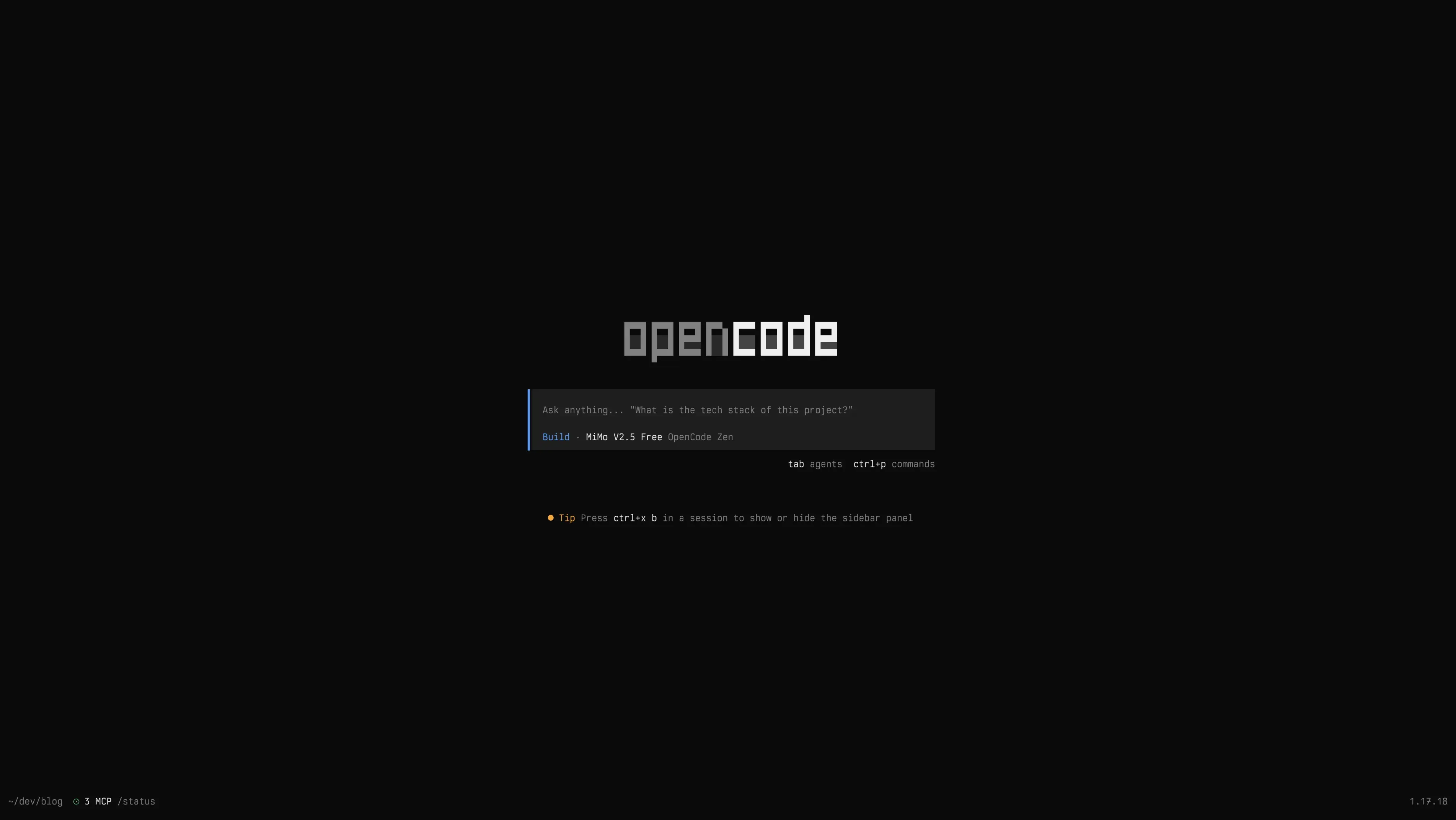
Once you’ve installed and ran opencode in your terminal, you should be greeted with this beautiful splashscreen.
The first step we need to do is connect to a provider. If you already use something like copilot or claude,
type /connect into the text box, press enter, type your provider name and follow the instructions.
If you don’t have an existing provider, we can use OpenCode as our provider instead! There are three things you should do:
- Head over to https://opencode.ai/zen and set up a free account.
- Generate an API key in the Settings menu.
- In OpenCode, type
/connect, press enter, select “OpenCode Zen” and paste your API key.
And voila, we’re ready to start working! First, we need to select the LLM (or the “brain”) we want to use for our agent.
For OpenCode Zen users, I highly recommend Deepseek v4 Flash or MiMo v2.5 Free. You can select a model by typing /models and
pressing enter.
Chapter 2: Best MCPs and Configuration
Personal Favourite List
Here is my personal favourite list of must-have MCP servers that make any model vastly more intelligent at its programming job:
- Context7 - vastly improves the agent’s ability to understand the best practices of a package or library.
- Serena - supercharges the model by giving it access to language tools like rename, find symbol and more. Also gives the agent access to memories which it can store about your codebase and retrieve at any time: this involves tech stack, project structure and conventions.
- Ponytail - set of prompts that “calm down” the model, ensuring it never overengineers or writes ugly code. Theoretically not an MCP, but I’m still grouping it here.
Tip: OpenCode hosts a customize-opencode skill — if you ask your agent to configure these three MCP servers
for you, it will do so! Talk about bootstrapping.
Also, be sure to download MCP models specific to your domain or programming language. For Elixir work, I absolutely love Tidewave. For devenv, I use the MCP shipped with the CLI. It genuinely makes the LLM guess less and work faster :)
Personal Configuration
Below is my full opencode.json:
{
  "$schema": "https://opencode.ai/config.json",
  "skills": {
    "paths": [
      "~/.config/opencode/skills"
    ]
  },
  "plugin": [
    "@dietrichgebert/ponytail"
  ],
  "mcp": {
    "serena": {
      "type": "local",
      "enabled": true,
      "command": [
        "serena",
        "start-mcp-server",
        "--context",
        "ide",
        "--project",
        "{cwd}"
      ],
      "environment": {
        "PYTHONUNBUFFERED": "1"
      }
    },
    "lean-lsp": {
      "type": "local",
      "enabled": false,
      "command": [
        "uvx",
        "lean-lsp-mcp"
      ]
    },
    "context7": {
      "type": "remote",
      "url": "https://mcp.context7.com/mcp",
      "enabled": true,
      "headers": {
        "CONTEXT7_API_KEY": "..."
      }
    }
  },
  "provider": {
    "mistral": {
      "npm": "@ai-sdk/openai-compatible",
      "name": "Mistral",
      "options": {
        "baseURL": "https://api.mistral.ai/v1",
        "apiKey": "{env:MISTRAL_API_KEY}"
      },
      "models": {
        "labs-leanstral-2603": {
          "name": "Leanstral",
          "tool_call": true,
          "limit": {
            "context": 256000,
            "output": 65536
          }
        }
      }
    },
    "llamacpp": {
      "npm": "@ai-sdk/openai-compatible",
      "name": "llama.cpp",
      "options": {
        "baseURL": "http://localhost:8080/v1",
        "apiKey": "noop"
      },
      "models": {
        "goedel-prover-v2-8b": {
          "name": "Goedel-Prover-V2-8B",
          "tool_call": true,
          "limit": {
            "context": 8192,
            "output": 4096
          }
        }
      }
    }
  },
  "permission": {
    "ask": "allow",
    "bash": "ask",
    "edit": "deny",
    "write": "deny"
  },
  "instructions": [
    "RULE: You must NEVER use the 'edit' or 'write' tools to modify code. These tools are permanently denied.\n\nAll code modifications MUST go through the Serena MCP tools (serena_replace_symbol_body, serena_insert_after_symbol, serena_insert_before_symbol, serena_replace_content, serena_rename_symbol, serena_safe_delete_symbol) or the tree-sitter MCP tools.\n\nWhen you need to modify code:\n1. First read and understand the code semantically using serena_get_symbols_overview, serena_find_symbol, serena_read_memory, or tree-sitter tools.\n2. Then apply changes using the appropriate Serena symbol-level tool (replace_symbol_body, insert_after_symbol, etc.).\n3. For bulk or regex-based replacements across a file, use serena_replace_content.\n4. Never fall back to raw text editing. If a Serena tool cannot express the change cleanly, then fall back on the tree-sitter MCP. Before writing ANY code, ALWAYS activate the `ponytail` skill."
  ]
}
There are a few surprises here:
- I have explicitly disabled the
editandwritecommands — I want the agent’s edits to go through Serena only. This forces the model to think semantically in terms of changes to functions and variables, not as changes to text. This helps it stay focused. - The prompt is quite strict and is surprisingly decent at keeping models on track.
- I really like Lean4.
Start Working
Now that you have OpenCode configured, drop into a codebase and ask it do perform a task. Maybe you were planning a long refactor? Maybe you wanted some input on a new feature? Just ask it and it’ll do the thing.
Chapter 3: DOs and DONTs
This section is dedicated to things you should and shoudn’t do with agents.
DO: constrain models’ abilities
The main problem with using agents for programming (especially weaker ones) is that they like to get lost. You may have noticed that during longer operations the agent can spiral and start doing ad-hoc things it shouldn’t even be thinking of doing.
The biggest solution to the naiveness of agents is constraining them. By putting an agent in a stricter environment, it’s easier for the agent to follow along with the rules. The tree-sitter MCP is a great example of this: it forces operations to be done on a syntax tree, not on raw text.
DON’T: worry about prompt engineering
As much as some people want you to believe otherwise, you’re wasting your time developing a perfect prompt. Just ask the agent what you want to achieve and optionally how you want to achieve it. It’ll either ask you further questions if it has any or it’ll fill in the details itself. Don’t obsess over writing the perfect query!
DO: use a strongly typed language with good compiler errors
I know that it’s not always possible to choose the language you write code in, but using a strongly typed language with good error messages makes for a night and day difference.
A good language means the model can write code, call the compiler’s build step, read errors and iterate again.
This way it never has to guess about how language features work.
DON’T: force the model to reparse everything each time
Agents are pretty smart but not very much — different agents might spot different gotchas or edge cases between runs in your code. Use something like Serena or a memory system that tells the model to write down its memories and discoveries somewhere. That way, a new agent can easily catch up to speed with the codebase and with various traps.
DON’T: develop new sophisticated projects with agents
Imagine that each known software project (the entire program) is contained as a dot in a 3D plot. You could imagine that internally, in an agent’s brain, this is the layout:
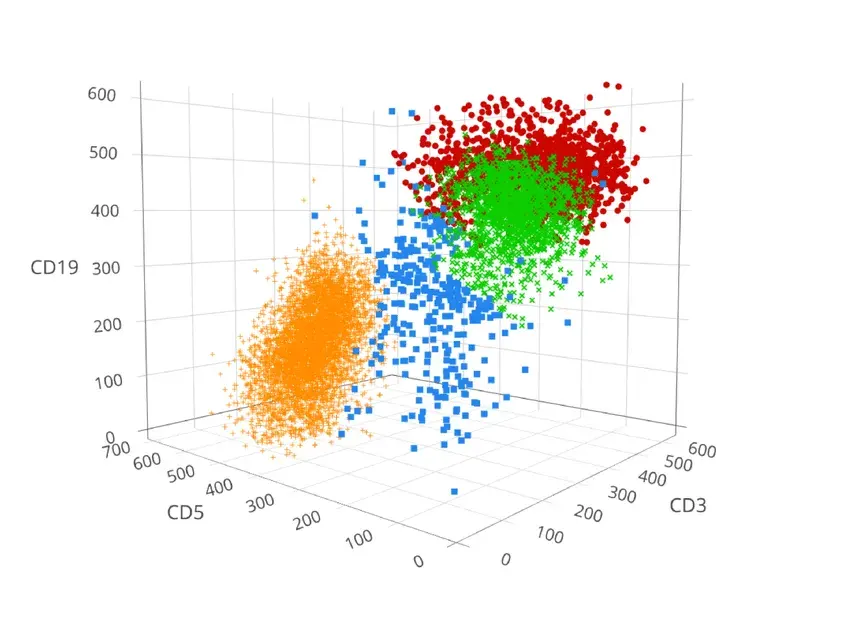
This aligns with the explanations in chapter 1 — an LLM has a space of tokens which it has learnt through tonnes of training data.
Common programs like CRUD applications, simple scripts, websites all cluster in one space — these are the dots that are clumped together. This is where the agent is solid at its job. In such case, you should be okay letting an LLM develop a new project from scratch for you, especially if it’s a one off script. This is because the agent has the most experience in these programs because it has found most of these in its training data.
However, most software projects, especially the more ambitious ones, are the more scattered dots in the plot. The agent doesn’t have much experience with writing programs like that, and thus will often make silly mistakes, stupid design decisions, will accumulate tech debt, will choose wrong dependencies, will misunderstand documentation, etc. Don’t trust an agent with starting a fresh project for you.
DON’T: let agents write tests for you
You are the ultimate decision maker and tester of the software. An agent can confabulate tests so that they always pass, misrepresent outputs, but most importantly: LLMs just write bad tests.
Make sure to write comprehensive integration tests, checking chunks of the API surface at a time. Keep unit tests to a general minimum — most people don’t know how to write good unit tests.
DO: write tests yourself all over your codebase
Agents are inherently untrustworthy and might break something silly that you weren’t expecting. By writing your own tests and covering a large portion of the codebase, you ensure that the agent catches its own mistake.
Smarter agents will always run formatting, linting checks and tests before finishing up their job. When they do so, they’ll notice the failing tests and debug their own mistake. This saves you time and potentially a lot of money!
DO: Use agents for aggressive refactors
This is my favourite use case for agents: they let me write suboptimal code and then clean it up with long, boring refactors that I wouldn’t want to do myself. An agent wrapped in a harness like Serena is highly unlikely to make a critical mistake, especially when paired with testing and a strong language like Rust.
This is an extension of the Extreme Programming doctrine: write code that works first, then refactor it into working state later. Just make sure you’re the one writing the initial code.
DO: take design inspirations from agents in mature projects
In a large, well structured codebase, LLMs see more context than you do — this is especially true in a multi-developer codebase which you don’t have full control over. Entering plan mode and asking the bot on how to structure some data or where to thread it can save you a lot of time if you know what you’re doing.
DO: get good at reviewing
Recent years have turned developers into a mixture: code review is now just as important as programming skills. This was of course generally true earlier, but it’s true now even for the solo developer.
Get good at understanding the intent behind code, even if it’s not written in the same style as yours. Also, learn to think critically of code, as this will help you catch LLM mistakes much earlier in the process.
DON’T: thrash an agent’s context window
Agents naturally get dumber with a longer context window — most strong models have a whopping 1 million context window, but some providers charge a higher price for usage with a context window filled with more than 256K tokens.
An initial filling of context window with preliminary data is okay, but try to use tools that purge the context window dynamically to keep the agent on track.
DO: write API surface yourself
This is a surprisingly powerful preventer of so-called comprehension debt. By writing the API surface yourself and letting an LLM fill in the details, you make sure that you understand the flow of data through the code before the filler details are added in.
This means your reviews will be less sloppy (less likely to let a mistake slip through) and faster.
To Be Continued
Over the comings days I will greatly expand this list with community suggestions and my own. Feel free to send me an email at vhyrro@gmail.com!
Conclusions
Agents are a powerful part of a developer’s toolbox, but must be used with care and with understanding of the limitations of the software. I don’t believe that agents should replace programmmers or do most of their work, but I do believe that a lot of code is repetitive and we could save a tonne of time by letting LLMs fill in the gaps we always need to fill in manually.
Cheers!
Footnotes
Footnotes
-
Fun Fact: LLMs have a concept called
temperature. When the temperature is cranked above 1, the percentages get flattened out so that each word becomes equally likely. When it’s less than 1, it means the less likely outputs get trimmed and ignored. As you can imagine, having a very high temperature means the model becomes very “creative” in its output, but it may spout complete nonsense sometimes. ↩